
Most small businesses don’t need a technician sitting in the building every day. They need fast fixes, secure remote access, and a clear plan for when something physical breaks.
In North Carolina, especially across the Triangle, hybrid work has reshaped expectations. Staff move between Durham, Raleigh, and Chapel Hill offices and home networks. Cloud tools power daily operations. When something fails, leaders care less about where the technician is located and more about how quickly the issue is resolved.
Some Brightleaf-area firms have weighed this balance directly, comparing remote-only models with regional partners who can respond both virtually and on-site. That tradeoff is discussed in more detail in this look at managed IT support in Brightleaf, where businesses evaluate responsiveness, accountability, and physical presence. The real question is not local versus remote. It is how the support model performs under pressure.
Why This Decision Looks Different for NC SMBs Today
Before 2020, many small businesses assumed IT support meant someone coming into the office. Today, that assumption no longer holds. North Carolina workplaces have shifted significantly toward hybrid and remote operations. Staff log in from home offices, shared workspaces, client sites, and satellite offices. That means support must work securely across multiple environments.
At the same time, vendor stacks have grown. Microsoft 365 or Google Workspace, VoIP systems, e-sign tools, accounting platforms, industry-specific applications, and cloud storage all interact daily. When issues arise, they rarely involve just one system. Uptime expectations have also increased. Clients expect responsiveness, secure communication, and uninterrupted service. The support model must handle distributed access, layered vendors, and rising security pressure without slowing productivity.
What Remote IT Support Does Best (Speed + Coverage + Monitoring)
Remote IT support excels at speed. Help desk teams can triage login issues, software errors, email problems, and configuration mistakes within minutes. There is no travel time. Secure remote access tools allow technicians to troubleshoot directly while users stay on the phone.
Proactive monitoring and maintenance also function best in centralized environments. Alerts from servers, endpoints, and cloud systems feed into monitoring platforms that detect problems before users notice them. Patch management checklists can be enforced across all devices without visiting each workstation.
Centralized documentation makes repeatable fixes possible. If one Durham office experiences a Microsoft 365 authentication loop, the solution can be replicated quickly across similar environments.For day-to-day support needs, remote models often reduce downtime faster than traditional break-fix on-site visits.
Where Local On-Site Support Still Matters (Hands-On Reality)
Remote access solves many problems, but not all of them. Network gear, firewalls, switches, and cabling still live in physical spaces. When an ISP demarcation issue occurs, someone must be present. Wi-Fi coverage gaps require on-site surveys. Office moves demand hands-on reconfiguration.
Healthcare clinics, retail stores, and downtown offices frequently depend on physical hardware such as POS terminals, printers, badge systems, and specialized equipment. When hardware fails, remote troubleshooting reaches its limits.
Secure hardware swaps and device disposal also require local coordination to protect data. In growing areas of Durham and the broader Triangle, office expansions and renovations are common. A purely remote provider may struggle to address these physical realities without local presence. Hands-on work remains part of modern IT.
Security Considerations: Remote Access Done Right
Remote support introduces security responsibilities that must be managed carefully. Multi-factor authentication for Microsoft 365 or Google Workspace is essential. Identity controls should follow principles similar to those outlined in the NIST Cybersecurity Framework, particularly within the “Protect” and “Detect” functions. Remote sessions must be logged, restricted, and protected by least-privilege access. Device posture checks and encryption policies ensure endpoints connecting remotely meet security standards.
Verizon’s 2025 Data Breach Investigations Report notes ransomware was present in 44 percent of breaches reviewed. That statistic reinforces the importance of secure remote containment. If an account is compromised, rapid remote response can isolate devices and reset credentials before damage spreads. Remote support is powerful but only when security controls are intentional and enforced.
Response Times and Escalation: The Real Differentiator
Whether support is local or remote, response time and escalation process determine real-world outcomes. A strong provider defines severity levels clearly. A P1 issue, such as a full office outage or POS failure, should receive near-immediate acknowledgment. A P2 issue, such as a single-user software problem, should still follow documented timelines. Service level agreements for initial response and escalation prevent confusion during high-pressure moments. After-hours coverage also matters. Many professional firms in North Carolina work outside traditional business hours during tax season, litigation deadlines, or major client deliverables. Support that ends at 5 p.m. may not align with operational reality. The true differentiator is not geography. It is accountability. Who owns the issue? Who coordinates vendors? Who communicates status updates? Those answers matter more than where the technician sits.
Costs and Risk Tradeoffs (Predictable vs Break/Fix)
Break-fix models appear affordable at first. You pay only when something goes wrong. But unpredictable issues rarely align with convenient timing. Emergency rates, overtime charges, and extended downtime create hidden costs. Industry surveys frequently report that organizations estimate hundreds of thousands of dollars per hour in downtime impact. Even for smaller firms, lost billable hours and delayed client work add up quickly.
Predictable managed support models typically bundle proactive monitoring, patch management, and backup oversight into a fixed monthly cost. That reduces surprise invoices and lowers operational risk. The real financial question becomes this: is it cheaper to prevent outages or to recover from them?
For many North Carolina SMBs, especially those with hybrid staff and vendor-heavy stacks, prevention produces more stable budgets and fewer disruptions.
A Practical Framework: Remote-First, Local-Ready, or Hybrid
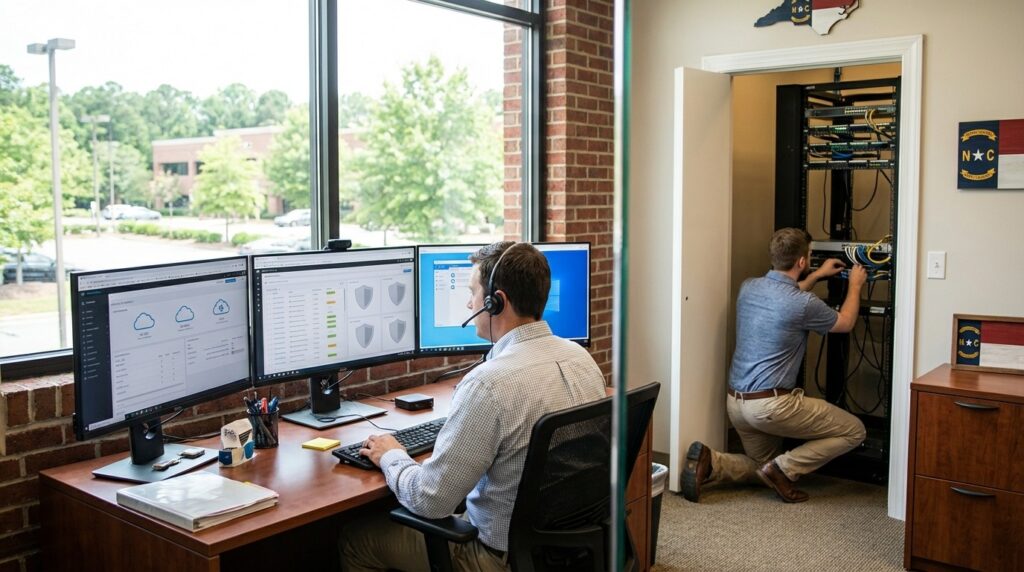
Instead of choosing sides, many businesses adopt a hybrid framework. A remote-first model handles daily help desk requests, monitoring, patching, and cloud administration. Local-ready coverage ensures someone can respond on-site for hardware failures, Wi-Fi issues, and office moves within defined timeframes.
Purely local models may feel reassuring but can lack centralized monitoring depth. Purely remote models may excel at speed but struggle with physical escalation. Hybrid support combines both strengths.
For example, a Durham clinic might rely on remote monitoring for endpoints and Microsoft 365 management while maintaining guaranteed on-site response within a set number of hours for network hardware issues. The key is designing the model around business operations, not tradition.
A Practical Decision Checklist for NC Small Businesses
When evaluating local versus remote IT support, use this simple selection checklist:
- Do you require on-site response within a defined number of hours for hardware or network issues?
- Are help desk SLAs documented for acknowledgment and resolution times?
- Is after-hours coverage available during peak seasons or critical deadlines?
- Is MFA enforced for all remote administrative access?
- Are remote support sessions logged and restricted?
- Is patching included and measured regularly?
- Are backups tested with restore drills?
- Do they coordinate ISP, VoIP, and SaaS vendors during outages?
- Is there a documented incident response plan and escalation path?
- Is network documentation and credential management maintained centrally?
Answering these questions clarifies whether a provider’s model aligns with your operational risk tolerance.
The Right Question Isn’t Local or Remote
For North Carolina small businesses, the debate should not focus on geography alone. Remote support delivers speed, scalability, and centralized oversight. Local support ensures physical systems receive attention when needed. Security requirements and state breach notification expectations make response processes and documentation essential, regardless of model.
The winning approach usually blends fast remote triage with defined escalation and on-site capability when hands are required.
In the end, reliability comes from process discipline, clear SLAs, proactive monitoring, and tested recovery plans. Businesses that evaluate support through that lens make decisions based on resilience and accountability rather than convenience or habit.